 ConsoliSheet
The difficult part is rarely opening the files. It is deciding which columns actually mean the same thing before you combine a single row.
Customer suggested match
Region manual decision
Gross Sales or Net Sales?
A worked example: two files, the same data, different headings
Two regional teams send this month’s sales. Both started from the same template, and both describe the same kind of record: who bought what, how many, and for how much.
north.xlsx
| Customer | SKU | Quantity | Revenue | |
|---|---|---|---|---|
| 2 | Acme Ltd | BX-100 | 12 | 480.00 |
| 3 | Halden & Co | BX-220 | 5 | 310.00 |
south.xlsx
| Client | Product Code | Qty | Sales | |
|---|---|---|---|---|
| 2 | Brook Supplies | BX-100 | 8 | 320.00 |
| 3 | Marlow Foods | CT-015 | 20 | 150.00 |
Pasting south.xlsx under north.xlsx appears to work, because the columns happen to be in the same order. That is luck rather than a method. The moment west.csv arrives with revenue, customer, sku, quantity, Region, position-based copying puts revenue figures under Customer and customer names under SKU, and nothing warns you.
There are really two separate questions here. Which columns are the same column written differently, and which are different columns that happen to look alike? The first is mechanical. The second needs someone who knows the data.
The kinds of column difference, and which are safe to resolve automatically
| Difference | Example | Safe to resolve automatically? | What to do |
|---|---|---|---|
| Column order | Revenue is first in west.csv | Yes | Match by heading, not position. |
| Formatting only | customer, Customer , CUSTOMER; product_code and Product Code | Yes | Normalise capitals, spaces, underscores and hyphens. |
| Extra column | Region only exists in west.csv | Yes | Keep it, and leave it blank for files that don’t have it. |
| Missing column | One file has no Quantity | Yes | Leave that file’s values blank. Never shift its other columns sideways. |
| Abbreviation | Qty and Quantity | Usually, but confirm | Confirm once. Check the values look alike. |
| Synonym | Customer and Client | Needs a decision | Confirm they describe the same thing before merging. |
| Same idea, different system | SKU and Product Code | Needs a decision | Only merge if both use the same code list. Compare a few sample values. |
| Similar name, different measure | Revenue and Sales; Gross Sales and Net Sales | No | Check the definitions. One may include VAT, discounts or returns. |
Why files from different people stop matching
Shared templates drift. One person renames a heading to match the language their team uses, another inserts a column for their own notes, a third exports from a system that names things its own way. Each change is reasonable locally. The problem only appears when the files are combined. This gradual divergence is often called spreadsheet schema drift, and it is the main reason a process that worked in January breaks by April.
Similar names are not proof of identical meaning
Capitalisation and spacing differences are usually safe to normalise automatically. Business terms are a different matter: “Gross Sales” and “Net Sales” look related but describe different figures, and treating them as interchangeable will quietly corrupt a report.
- Revenue and Sales. In one team “Sales” means invoiced value including VAT; in another it is net of returns. Merged into one column, the total is meaningless, yet it looks perfectly plausible.
- SKU and Product Code. If one supplier uses your internal codes and another uses its own catalogue numbers, a merged column joins to the wrong products later.
- Wholesale Price, Trade Price and Cost. These can be three different numbers for the same item. Similar wording is exactly where automatic matching is most tempting and most dangerous.
A good test: look at five sample values from each column side by side. If you cannot say with confidence that they measure the same thing in the same unit, keep the columns separate until someone who owns the data decides.
Method 1: by hand in Excel
For a handful of files, this is entirely reasonable.
It works, but it is slow, and the copying step is where values land in the wrong column. If you do this every month, use one of the methods below.
Method 2: Power Query
Power Query’s From Folder import is excellent when every file shares one structure. When headings differ, the reliable pattern is: rename each file’s columns to your standard names first, then combine. Table.Combine lines tables up by column name, keeps every column, and fills missing ones with null.
let
    Files    = Folder.Files("C:\Reports\Sales"),
    Xlsx     = Table.SelectRows(Files, each [Extension] = ".xlsx"),
    Renames  = {{"Client", "Customer"}, {"Product Code", "SKU"},
                {"Qty", "Quantity"}, {"Sales", "Revenue"}},
    Prepared = Table.AddColumn(Xlsx, "Data", (f) =>
        let
            Sheet   = Excel.Workbook(f[Content], true){0}[Data],
            Renamed = Table.RenameColumns(Sheet, Renames, MissingField.Ignore)
        in
            Table.AddColumn(Renamed, "Source File", each f[Name])),
    Combined = Table.Combine(Prepared[Data])
in
CombinedMissingField.Ignorelets one rename list cover every file, even files that don’t contain some of the old names.- The rename list is your mapping decision, written down. Add to it when a new variation appears.
- A file containing both Client and Customer makes the rename fail, because the column already exists. Decide which one wins first.
{0}takes the first sheet or table in each workbook, and the headings must be on its first row. If files have title rows above the headings, remove them before promoting headers.
If you would rather not maintain the query, or the files change shape every month, a guided tool can do the same job. Power Query Combine Files problems covers the common errors in detail.
Method 3: ConsoliSheet
ConsoliSheet is built for exactly this situation: spreadsheets from different people or systems that describe the same data in slightly different shapes.
Columns that only some files have are kept, with blanks for the rest. ConsoliSheet can suggest Client → Customer, Product Code → SKU and Qty → Quantity, but the default is to keep them separate until you accept. Other pairs, such as Sales → Revenue and Territory → Region, are not suggested; you may combine them manually after checking their meaning. A refused or untouched suggestion leaves both columns separate. Review the proposed columns and preview the result before downloading.
A tested example: five monthly reports that don’t quite match
To show exactly what happens, we built five small monthly sales reports with the problems described above, ran them through ConsoliSheet and published both the files and the result. Every customer and product code is invented.
Select any screenshot to open it at full size.
The problem: five months, five slightly different files
| File | What is different |
|---|---|
| January.xlsx | The baseline: Customer, SKU, Quantity, Revenue, Region |
| February.xlsx | The same fields in a different order, with headings that differ only in capitals and spaces (REVENUE, customer, Sku) |
| March.csv | Semicolon-separated, with different words: Client, Product Code, Qty, Sales, Territory |
| April.xlsx | Two title rows and a blank row above the table; extra Sales Rep and Notes columns |
| May.xlsx | No Region column; a SUM total row under the data; a short notes block beside the table |
What ConsoliSheet resolves automatically
- It finds each table: April’s data starts below its title rows, and May’s notes block is not treated as data.
- It lines up February’s headings with January’s, despite the different capitals, spacing and column order.
- It keeps Sales Rep and Notes, which only April has, and leaves them blank for the other months. Region is blank for May.
- It leaves out May’s total row, because it is a SUM of the rows above, and tells you it has done so.
- It reads March’s semicolon-separated CSV alongside the Excel files.
Before you make any decision, the five files produce twelve columns, because March’s five differently worded headings are kept apart:
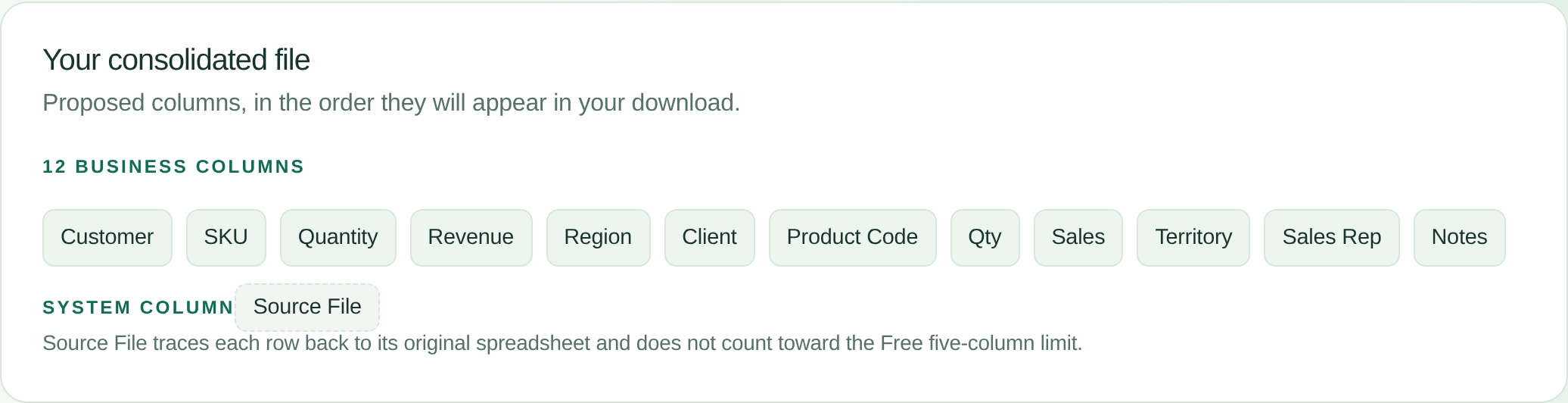
Three possible matches, suggested but not applied
ConsoliSheet recognises a small, deliberately cautious set of wording differences. Here it suggests three, all from March: Client → Customer, Product Code → SKU and Qty → Quantity. Each suggestion starts on Keep separate, so doing nothing leaves the columns apart. Many synonyms are not recognised at all; those are left for you to decide.
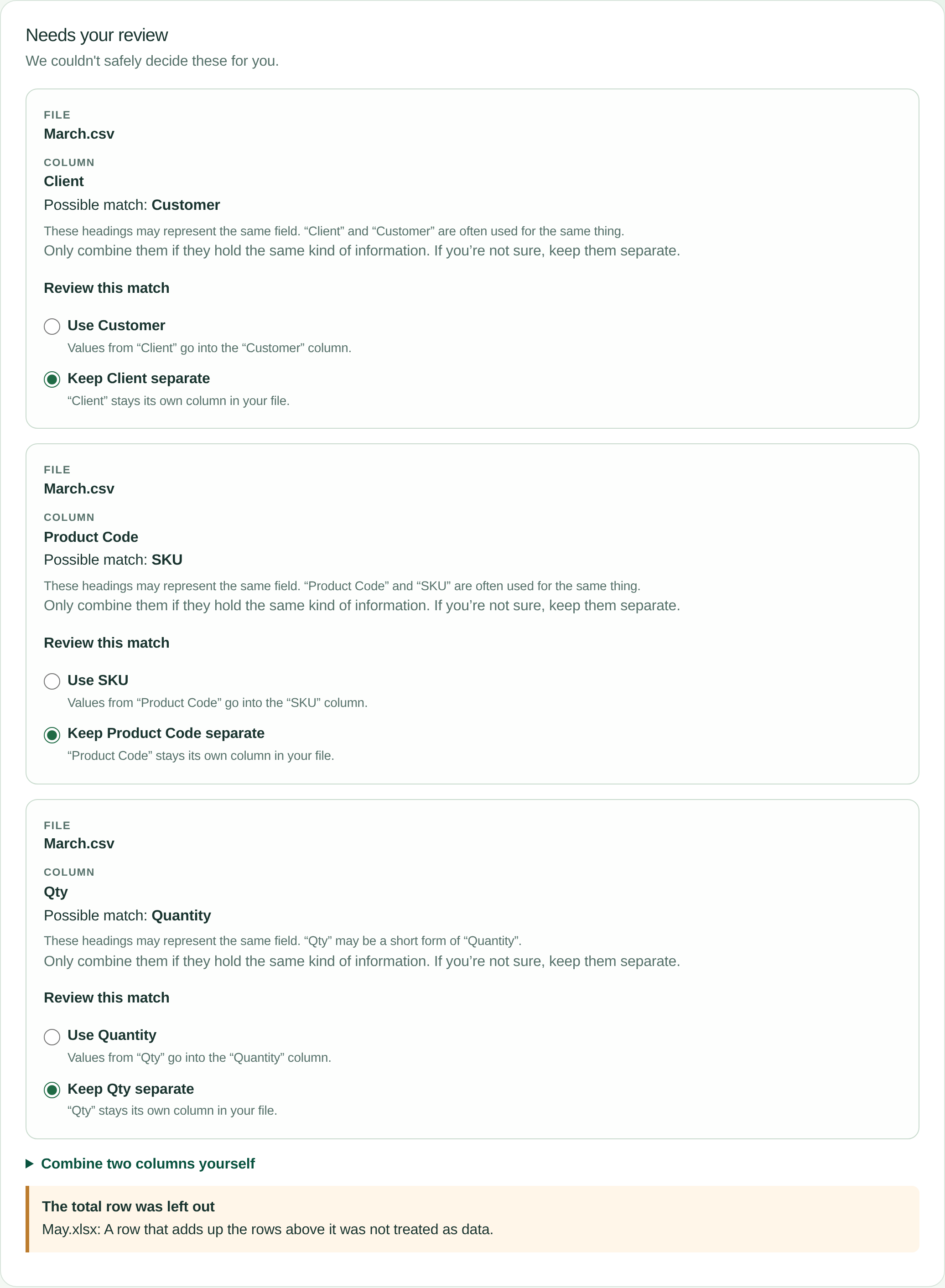
We checked a few values in each pair and chose Use for all three. That leaves nine columns.
Two decisions only a person can make
Sales → Revenue and Territory → Region are not suggested. In many businesses Sales and Revenue are different figures, for example gross and net, and a territory is not always the same thing as a region. In these files they do mean the same thing, so we combined them ourselves with Combine two columns yourself. Each manual combination is listed with its file and can be undone.
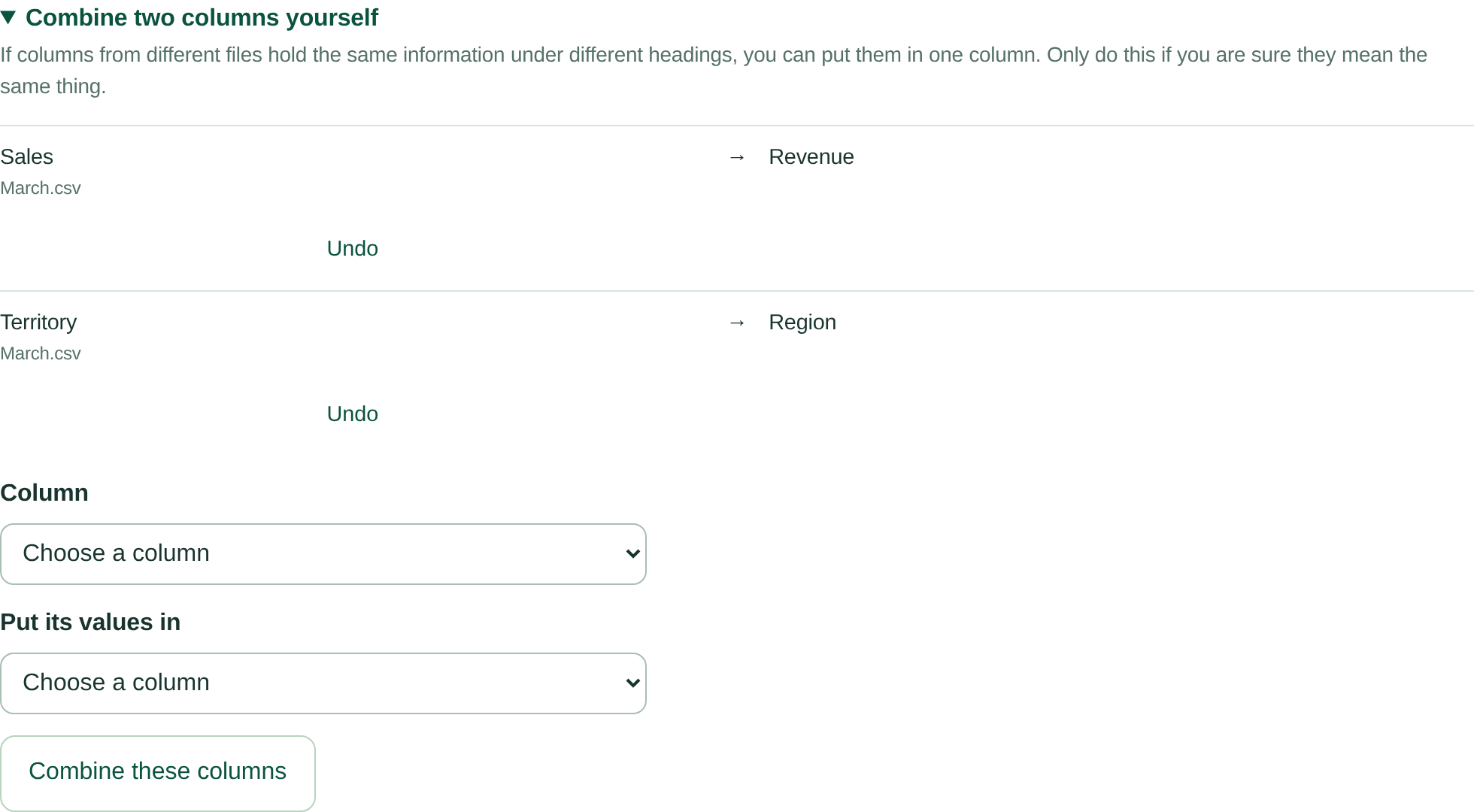
ConsoliSheet refuses a combination that would put two values in one place, for example when the same file already has both columns. It keeps both columns and explains why.
The result: seven business columns plus Source File

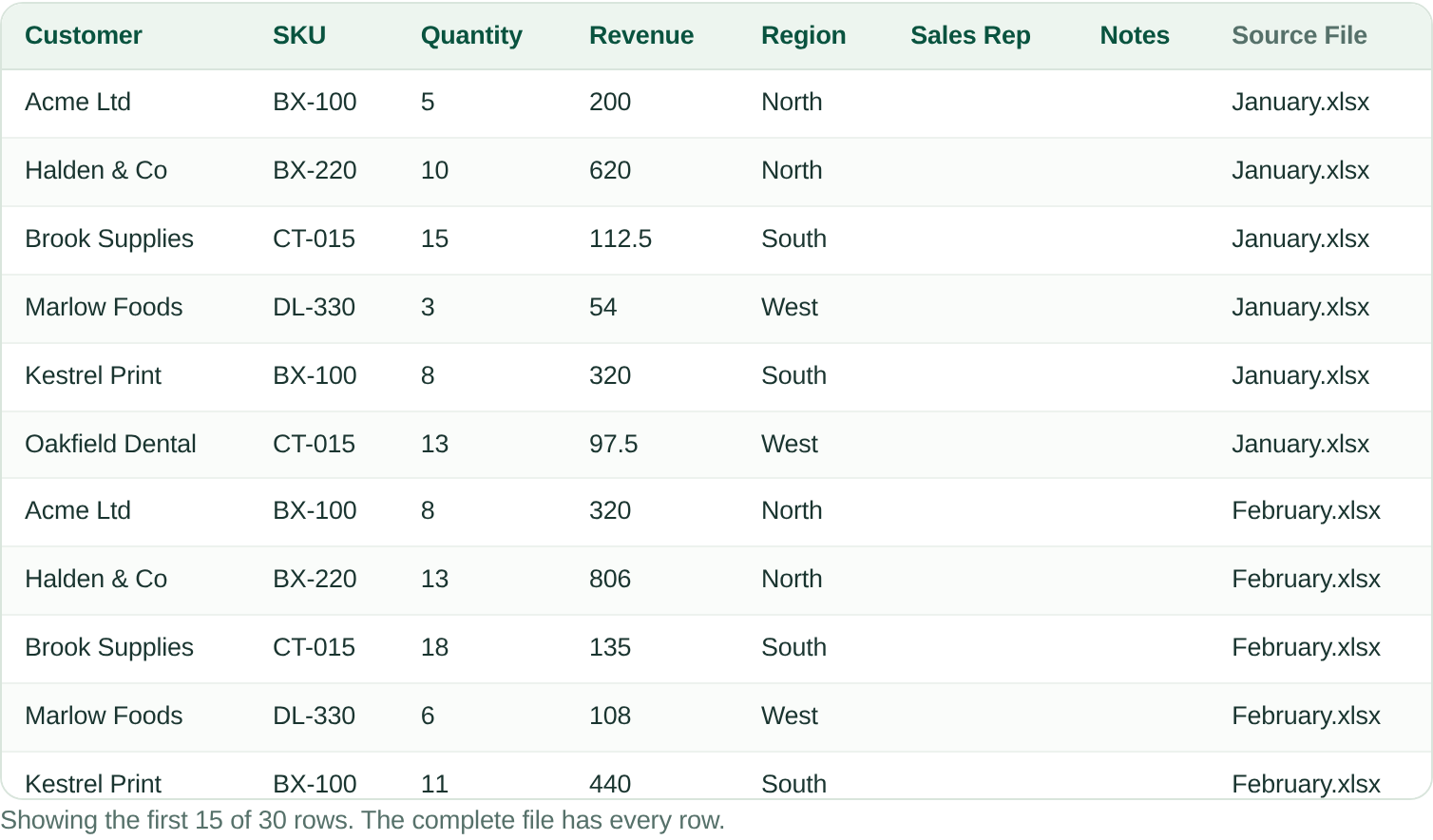
The completed workbook has 30 rows: six from each file, in file order and in each file’s original row order. Source File on every row names the spreadsheet it came from.
- Left out: May’s SUM total row, May’s notes block and April’s title rows. Nothing else.
- Kept: every data row and every filled value from the five files. This sample contains no exactly repeated rows, so it does not test duplicates; ConsoliSheet’s handling of those (exact duplicate rows are kept, not removed) was confirmed in separate production acceptance testing.
- Blank on purpose: Region for May, and Sales Rep and Notes for every month except April.
- Worth knowing: March’s numbers arrive as text, for example 440.0. ConsoliSheet does not yet convert numbers in CSV files, so convert that column in Excel before you calculate with it. A total typed in as a plain number, rather than a formula, would be kept as an ordinary row.
- Not remembered: these decisions apply to this consolidation only. ConsoliSheet does not save them for next month’s files.
See all 30 rows of the completed workbook
| Row | Customer | SKU | Quantity | Revenue | Region | Sales Rep | Notes | Source File |
|---|---|---|---|---|---|---|---|---|
| 2 | Acme Ltd | BX-100 | 5 | 200 | North | January.xlsx | ||
| 3 | Halden & Co | BX-220 | 10 | 620 | North | January.xlsx | ||
| 4 | Brook Supplies | CT-015 | 15 | 112.5 | South | January.xlsx | ||
| 5 | Marlow Foods | DL-330 | 3 | 54 | West | January.xlsx | ||
| 6 | Kestrel Print | BX-100 | 8 | 320 | South | January.xlsx | ||
| 7 | Oakfield Dental | CT-015 | 13 | 97.5 | West | January.xlsx | ||
| 8 | Acme Ltd | BX-100 | 8 | 320 | North | February.xlsx | ||
| 9 | Halden & Co | BX-220 | 13 | 806 | North | February.xlsx | ||
| 10 | Brook Supplies | CT-015 | 18 | 135 | South | February.xlsx | ||
| 11 | Marlow Foods | DL-330 | 6 | 108 | West | February.xlsx | ||
| 12 | Kestrel Print | BX-100 | 11 | 440 | South | February.xlsx | ||
| 13 | Oakfield Dental | CT-015 | 16 | 120 | West | February.xlsx | ||
| 14 | Acme Ltd | BX-100 | 11 | 440.0 | North | March.csv | ||
| 15 | Halden & Co | BX-220 | 16 | 992.0 | North | March.csv | ||
| 16 | Brook Supplies | CT-015 | 4 | 30.0 | South | March.csv | ||
| 17 | Marlow Foods | DL-330 | 9 | 162.0 | West | March.csv | ||
| 18 | Kestrel Print | BX-100 | 14 | 560.0 | South | March.csv | ||
| 19 | Oakfield Dental | CT-015 | 2 | 15.0 | West | March.csv | ||
| 20 | Acme Ltd | BX-100 | 14 | 560 | North | J. Patel | Repeat order | April.xlsx |
| 21 | Halden & Co | BX-220 | 2 | 124 | North | S. Okafor | April.xlsx | |
| 22 | Brook Supplies | CT-015 | 7 | 52.5 | South | R. Byrne | April.xlsx | |
| 23 | Marlow Foods | DL-330 | 12 | 216 | West | J. Patel | Repeat order | April.xlsx |
| 24 | Kestrel Print | BX-100 | 17 | 680 | South | M. Kowalski | April.xlsx | |
| 25 | Oakfield Dental | CT-015 | 5 | 37.5 | West | S. Okafor | April.xlsx | |
| 26 | Acme Ltd | BX-100 | 17 | 680 | May.xlsx | |||
| 27 | Halden & Co | BX-220 | 5 | 310 | May.xlsx | |||
| 28 | Brook Supplies | CT-015 | 10 | 75 | May.xlsx | |||
| 29 | Marlow Foods | DL-330 | 15 | 270 | May.xlsx | |||
| 30 | Kestrel Print | BX-100 | 3 | 120 | May.xlsx | |||
| 31 | Oakfield Dental | CT-015 | 8 | 60 | May.xlsx |
The completed workbook was produced by ConsoliSheet’s processor, the version that runs on consolisheet.com, from exactly these files and decisions. When we ran the same files on the live site, its preview showed the same first rows.
What is free
Source File does not count toward the Free plan’s five business columns. This result has seven, so on consolisheet.com the complete download is a paid result; uploading, reviewing, confirming and a preview of the first rows are free. With five business columns or fewer, the complete download is free.
Download the example
Download the files and try the same steps yourself at Quick Consolidate. Every file is invented sample data.
- The five sample files: January.xlsx, February.xlsx, March.csv, April.xlsx and May.xlsx (about 5 KB each)
- The completed workbook: ConsoliSheet-example-consolidated.xlsx (6 KB), as produced by ConsoliSheet’s processor
- Notes: README.txt explains each decision; SHA256SUMS.txt lists the file checksums
Which method should you use?
| Your situation | Usually the best approach |
|---|---|
| Two or three files, a one-off job | By hand in Excel |
| The same template every month, and you are comfortable with queries | Power Query with a rename list |
| Files from different people or systems that don’t quite match, especially when the differences change | ConsoliSheet |
| A scheduled pipeline feeding a database or warehouse | A workflow or ETL tool, or Python |
For a fuller comparison, including Python and online mergers, see the best ways to combine multiple Excel files.
Keep a trace to the source
Add a Source File column to the combined output. When a number looks wrong later, this is what lets you go back to the exact spreadsheet it came from instead of re-checking everything.
Common questions
How do I combine Excel files with different column names?
Match columns by heading rather than position. Line up columns that differ only in order or formatting automatically, keep columns that only some files have, and decide deliberately whether differently worded headings, such as Customer and Client, are the same field before merging them. Add a Source File column so each row can be traced.
Does column order matter?
Not if you match by heading rather than position. Position-based copying is exactly what causes values to land under the wrong column when files differ.
What if a column exists in only one file?
Decide deliberately whether it belongs in the output. Leave it blank for the other sources rather than letting its presence shift unrelated values sideways.
Should Customer and Client be merged into one column?
Only when someone who knows the data confirms they describe the same thing. ConsoliSheet may suggest Client → Customer, but Keep separate is selected by default. Sales and Revenue require a manual decision; even suggested pairs such as SKU and Product Code still need checking.
Does ConsoliSheet combine Sales and Revenue automatically?
No. Sales and Revenue are not suggested, because in many businesses they are different figures. If they mean the same thing in your files, combine them yourself in the review; the decision applies to that consolidation only.
Can Power Query combine files with different column names?
Yes, with extra steps. Rename each file’s columns to standard names, for example with Table.RenameColumns and MissingField.Ignore, then combine with Table.Combine, which keeps every column and fills missing ones with null.
How do I merge Excel files without losing columns?
Combine by column name and keep the union of all columns, leaving blanks where a file has no value. Tools that copy by position, or that take their column list from the first file, can drop or misplace columns that only later files have.
How do I know which file each row came from after combining?
Add a column holding the source file name to every row before or while combining. ConsoliSheet adds a Source File column automatically; in Power Query, add it per file as in the example above.
Have files like this to combine?
Upload your Excel or CSV files and ConsoliSheet lines the columns up by heading rather than position. Headings that differ only in capitals, extra spaces, underscores or hyphens are matched for you; selected wording variants are suggested for your approval, and you can map other headings manually. Nothing is combined on a semantic guess.
Try Quick Consolidate